Crossing Signal Controller
PICAXE 08M & 12F683

Revised 03-05-09

The objective of this project is to design and construct a controller that will operate a crossing signal.  When a train passes the first sensor the crossing lights will be activated (by a relay).  The lights will stay on until the  last car in the train passes the other sensor.

This circuit utilizes the PICAXE 08M processor or a PIC 12F683 and Pulsed Infrared Sensors. (click here for more information on these sensors)

Note that reed switches or other sensors could easily be substituted for the IR sensors.

A revision to the objective stated above involves using the same circuit and software to control a crossing so that a train on the main line (the train with priority in going through the crossing) cuts power to a block stopping a train that is operating on the other line.  The other train should never be stopped while any part of it is on the crossing (that would be BAD) and it should not be stopped if it has already passed through the crossing.

Click here to go directly to the latest version


Overview:
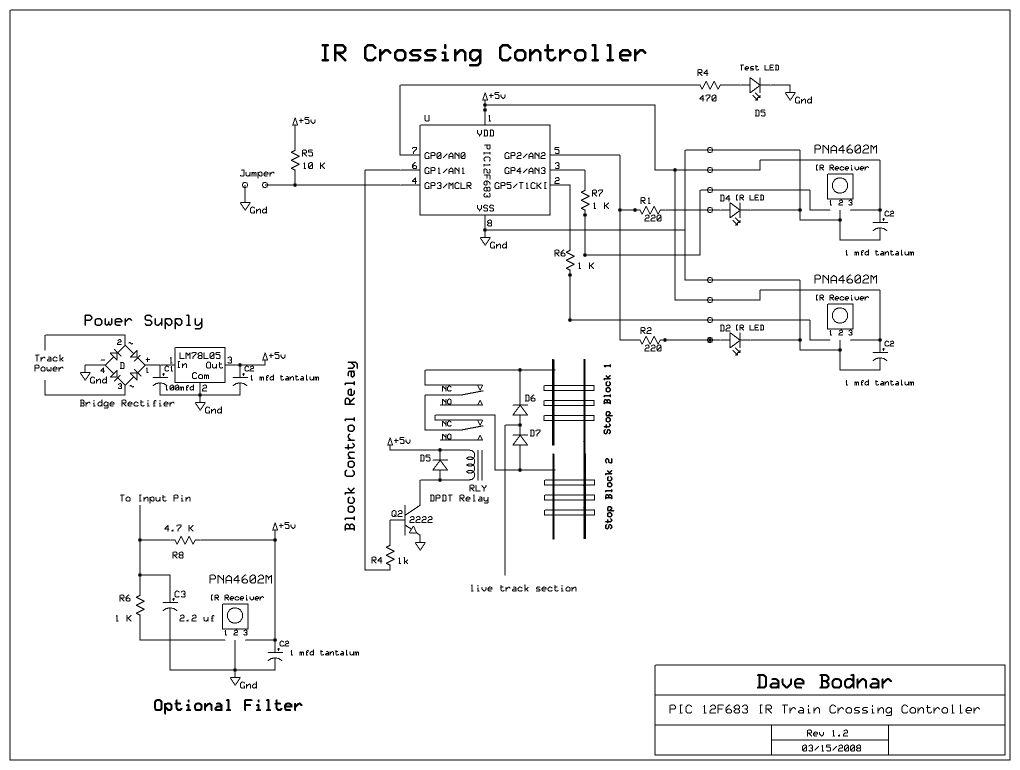
The microcontroller produces pulses at 38 kHz  on pin #5 (out2) which drive two infrared LEDs through 220 ohm current limiting resistors.  These IR LEDs are placed on either side of the crossing.  The IR sensors (PNA4602M) are placed next to the IR emitters so that they will detect IR that reflects off of the passing train.  (The article referenced above goes in to detail about the placement of the emitters and detectors)

When a train passes in front of either sensor a pulse from the PNA4602M is detected and the relay that is connected to pin #6 (out1) is pulled activated.  When the train passes in front of the other sensor the microcontroller begins to monitor the sensor and opens the relay after no additional pulses from it are received for several seconds.  This assures that the entire train has passed the sensor before the crossing relay is opened and the crossing lights extinguished.

This circuit does nothing to flash the lights or start sounds.  It only activates whatever is connected to the relay contacts.  It should be possible to use the Test LED output on pin #7 (out0) to flash lights should that be desired.  As it is now the Test LED simply shows when the second sensor is pulsing as the train passes it.

Schematic PICAXE 08M Version:
Notes:
  • A bypass capacitor is needed between the positive and negative terminals of the PNA4602M.  This must be connected as close to the sensor as possible.  A 1 mfd tantalum is specified but just about any small value cap should work. 
  • A 220 ohm resistor is used for current limiting on both of the IR LEDs.  A larger value resistor can be used if there is too much reflection from nearby objects.  I have also used a 1000 or 5000 ohm potentiometer to vary the brightness of the IR LED.  If you use a pot be sure to put it in series with the 220 ohm resistor so you never drop the total resistance below 220 ohms.
  • The filter caps on the power supply can be changed as needed to give a clean voltage to the 08M.
  • The LED and resistor on the relay are optional and are there only to give a visual indication of the relay's state.  Any general purpose NPN transistor can be used to activate the relay.


Software for 08M Version:
Notes:
  • This program may utilize IR sensors or simple SPST switches that are normally high and go low when pushed. 
  • The Counter variable is set to 1000 in the program.  It is the number of times the loop must be executed before the crossing lights are shut off.  Every time another car passes the counter is reset to 0.  Increase or decrease this value to change how long the sensor must not be pulsed before the relay opens
  • The labels and variables should help with understanding the program flow.

'08M Crossing Controller - d. bodnar 02-01-08
SYMBOL Sensor1 = pin3   'pin in3
SYMBOL Sensor2 = pin4   'pin in4
SYMBOL Relay = 1        'pin out1
SYMBOL IR_LED = 2       'pin out2
SYMBOL Counter = W0
SYMBOL Test_LED = 0

LOW Relay 'make sure relay is open

PWMOUT IR_LED, 25, 52 'start 38 kHz for IR

Start:
LOW Test_LED
Counter=0
IF Sensor1=0 THEN GOTO SawSensor1 'note sensor =0 if active
IF Sensor2=0 THEN GOTO SawSensor2 'note sensor =1 if no train
GOTO Start:

SawSensor1:
HIGH Relay
IF Sensor2=1 THEN GOTO SawSensor1: 'stay here till other sensor seen
GOTO WaitTillSensor2Cleared:

SawSensor2:
HIGH Relay
IF Sensor1=1 THEN GOTO SawSensor2: 'stay here till other sensor seen
GOTO WaitTillSensor1Cleared:


WaitTillSensor1Cleared:
IF Sensor1=0 THEN ResetCounter1 'if train seen reset clear counter
Counter=Counter+1
HIGH Test_LED
IF Counter=1000 THEN TrainHasPassed:'if no train seen shut off lights
GOTO WaitTillSensor1Cleared:

ResetCounter1:
LOW Test_LED
Counter=0
GOTO WaitTillSensor1Cleared

WaitTillSensor2Cleared:
IF Sensor2=0 THEN ResetCounter2 'if train seen reset clear counter
Counter=Counter+1
HIGH Test_LED
IF Counter=1000 THEN TrainHasPassed:'if no train seen shut off lights
GOTO WaitTillSensor2Cleared:

ResetCounter2:
LOW Test_LED
Counter=0
GOTO WaitTillSensor2Cleared

TrainHasPassed:
LOW Relay
PAUSE 1000
GOTO Start:


Schematic 16F684 Version
The two schematics are nearly identical except for the location and connection of pins.  The jumper allows for switching between sensors that are looking for reflected light and those that are "across the tracks" units.  With the jumper removed (open) reflective sensors are used.


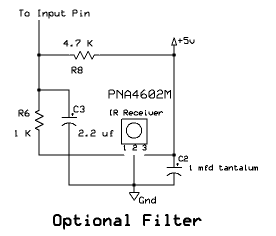
If the power supply is noisy the following filter, composed of C3 and R8, is suggested to clean up the pulses from the detector.  Duplicate the filter on each detector.

Software for 12F683 version (38kHz_IR_12f683-Crossing_Signal_Controlv1-4):
Notes:
  • This program may utilize IR sensors or simple SPST switches that are normally high and go low when pushed. 
  • The Counter variable is set to 1000 in the program.  It is the number of times the loop must be executed before the crossing lights are shut off.  Every time another car passes the counter is reset to 0.  Increase or decrease this value to change how long the sensor must not be pulsed before the relay opens
  • The labels and variables should help with understanding the program flow.
  • The programs are nearly identical except for the definition of variables and i/o pins
'd. bodnar revised 2-2-08
'Note2: GPIO.3 can't be connected to IR sensor while using ICSP
 @ DEVICE  MCLR_OFF
ansel = 0          'all inputs digital
cmcon0 = 7          

Sensor1	 VAR gpio.4     'pin 3
Sensor2	 VAR gpio.5     'pin 2
Relay	 VAR gpio.1     'pin 6
IR_LED	 VAR gpio.2		'pin 5 - use HPWM 2, ...
Counter	 VAR WORD
Temp     VAR WORD
Test_LED VAR gpio.0     'pin 7
Inverted VAR gpio.3     'pin 4 - unused so far!
Train    VAR BIT        'value when sensor sees train
NoTrain  VAR BIT        'value when sensor does not see train
gpio = %00111000        '3 & 5 inputs for sensors
HPWM 2,  127,38000          '50% duty cycle @ 38kHz     PIN 5 on 12f683
Train   =   0       '=0 for reflective sensor & =1 for cut beam
NoTrain =   1       '=1 for reflective sensor & =0 for cut beam
'for counter=1 to 5:high test_led :pause 100:low test_led:pause 100:next counter
LOW Relay

Start:    
IF Inverted = 1 THEN 'if jumper off use reflected
    Train = 0
    NoTrain =1
 ELSE
    Train = 1
    NoTrain = 0
ENDIF
LOW Test_LED
Counter=0
IF Sensor1=Train THEN
    FOR Temp=1 TO 10
        IF Sensor1=NoTrain THEN Start:
    NEXT Temp
    GOTO SawSensor1 	'note sensor =0 if active
ENDIF
IF Sensor2=Train THEN
    FOR Temp=1 TO 10
        IF Sensor2=NoTrain THEN Start:
    NEXT Temp
    GOTO SawSensor2	'note sensor =1 if no train
ENDIF
GOTO Start:

SawSensor1:
HIGH Relay
IF Sensor2=NoTrain THEN SawSensor1:
FOR Temp = 1 TO 10   'detect glitches
  IF Sensor2=NoTrain THEN SawSensor1
NEXT Temp
GOTO WaitTillSensor2Cleared:

SawSensor2:
HIGH Relay
IF Sensor1=NoTrain THEN SawSensor2:
FOR Temp = 1 TO 10   'detect glitches
  IF Sensor1=NoTrain THEN SawSensor2
NEXT Temp
GOTO WaitTillSensor1Cleared:

WaitTillSensor1Cleared:
IF Sensor1=Train THEN ResetCounter1	'if train seen reset clear counter
Counter=Counter+1
PAUSE 1
HIGH Test_LED
IF Counter=1000 THEN TrainHasPassed:'if no train seen shut off lights
GOTO WaitTillSensor1Cleared:

ResetCounter1:
LOW Test_LED
Counter=0
GOTO WaitTillSensor1Cleared

WaitTillSensor2Cleared:
IF Sensor2=Train THEN ResetCounter2	'if train seen reset clear counter
Counter=Counter+1
PAUSE 1
HIGH Test_LED
IF Counter=1000 THEN TrainHasPassed:'if no train seen shut off lights
GOTO WaitTillSensor2Cleared:

ResetCounter2:
LOW Test_LED
Counter=0
GOTO WaitTillSensor2Cleared

TrainHasPassed:
LOW Relay
PAUSE 1000
GOTO Start:
 
 
Prototype Unit - 12F683 version

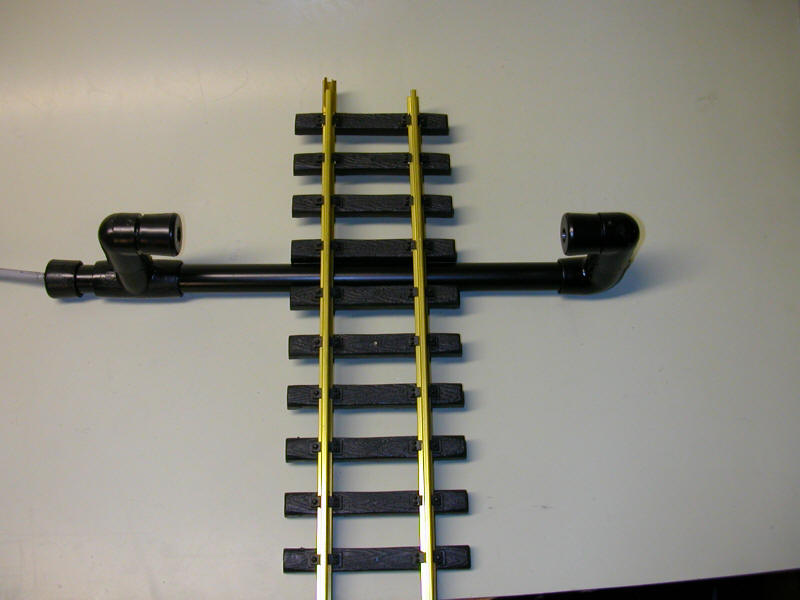
The test unit is shown below.  It used sensors that are constructed based on the information discussed under Projects / Infrared Train Detector

It's ugly but it works!

Here is the 2nd version - much neater!

Custom Circuit Board
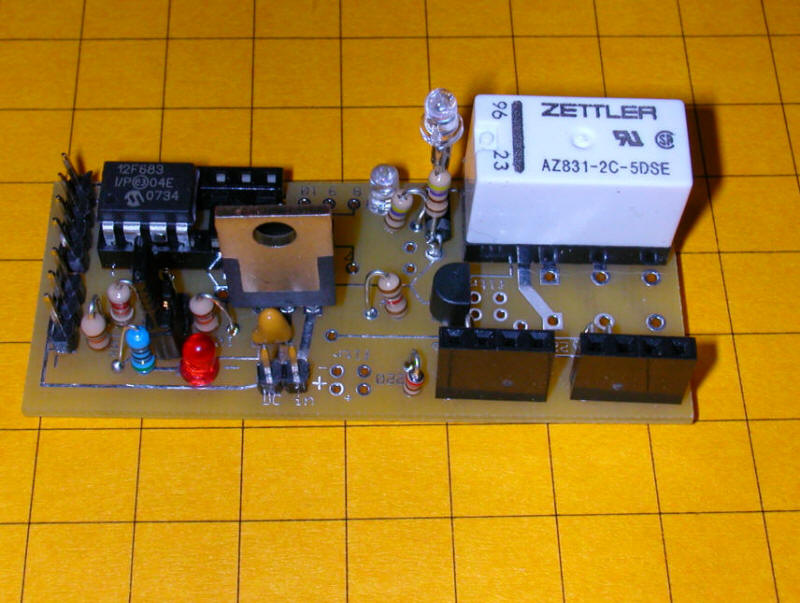
After successful testing of the prototype a custom board was designed and sent out for fabrication.  The result is shown below.

The microcontroller is in the upper left, a 12f683 PIC.  The board will also support a PICAXE 08M or 14M as well as PIC 16F684.  The relay is in the upper right.  The two IR emitter / sensor units connect to the 4 pin headers in the lower right.  DC power (6-24 volts) connects to the 2 pins bottom center.

The two sets of pins at the bottom of this photo are the programming connections.  The set of 3 pins is for programming a PICAXE.  The set of 4 pins is for PIC ICSP programming.  The jumper (lower right) determines if the sensors are reflective or across-the-track units.

The LED next to the relay lights when the relay is closed.  The other LED is for testing.  The 7805 voltage regulator is clearly visible in this image.

Some additional wiring was needed to support the test LED


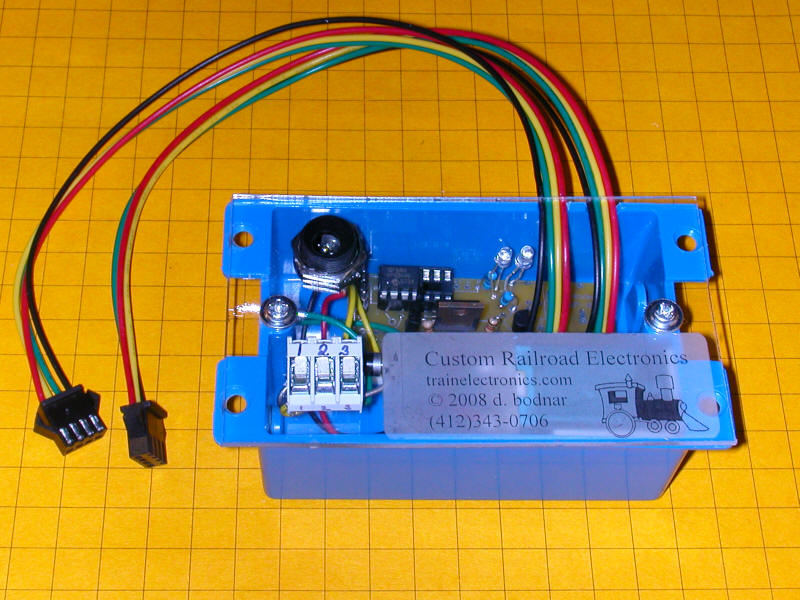
Complete Crossing Unit

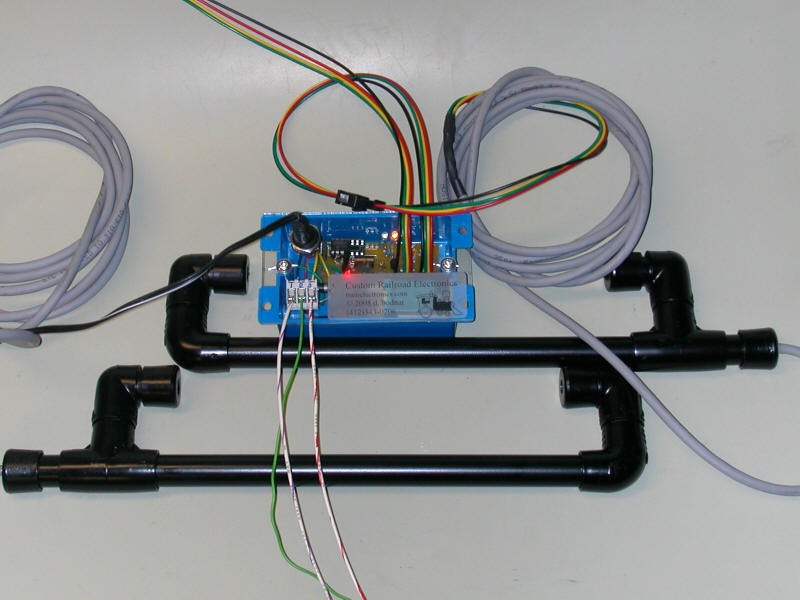
The unit below is an enclosed version of the controller.  The two 4 wire cables connect to the two IR sensors.  Power goes into the receptacle in the upper left and the three track connections go to terminals 1, 2 and 3 in the lower left.

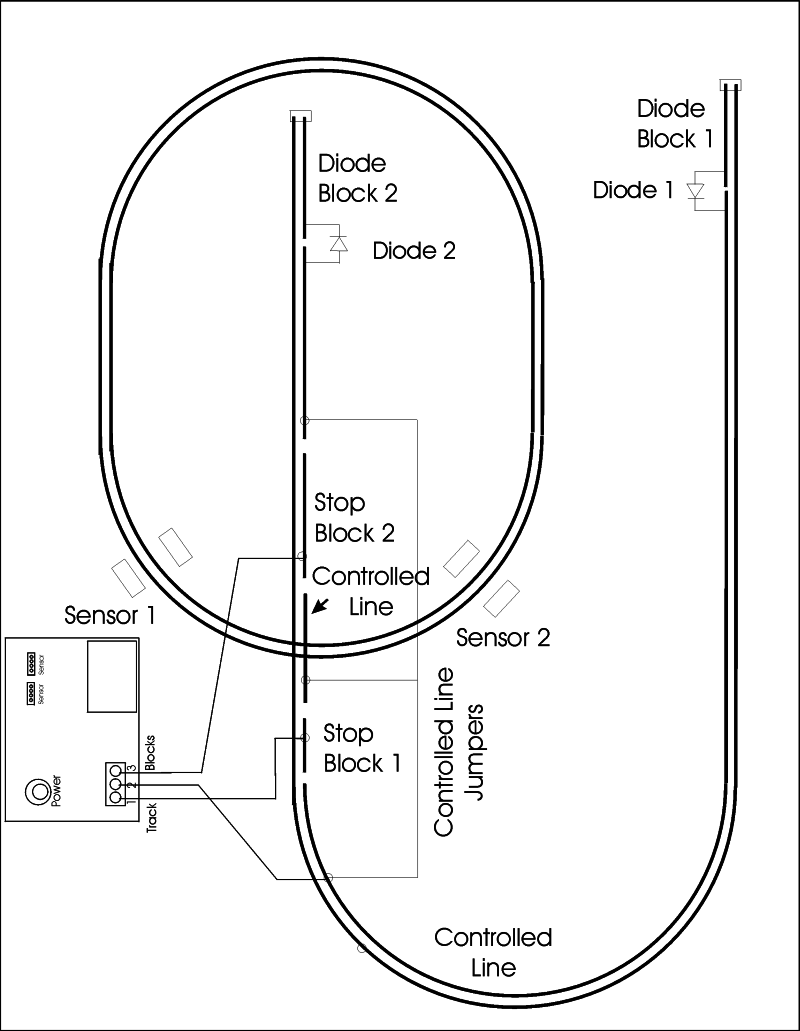
The following diagram assumes that the main line is the oval.  The train can run in either a clockwise or counterclockwise direction.  The trolley that is stopped to avoid a collision at the crossing is on the point-to-point labeled "Controlled Line".

The trolley line is broken by insulators into several isolated blocks.  The two "Diode Blocks" are needed to stop the train at either end.  The block of concern to us are those labeled "Stop Block 1" and "Stop Block 2".  One is to the left of the crossing and one to the right.  The power to "Stop Block 1" goes to the terminal marked 1 on the controller.  Terminal number 2 on the controller goes to the live part of the track.  Note that there is a jumper from each end of the isolated track to the center section that goes through the crossing.  These three sections must be connected with the connection continuing to terminal #2 on the controller.  Note that all of the cuts in the track happen on one side of the track.

The sensors go on either side of the crossing at a distance of 2 or 3 feet from the crossing.   When the main line train hits one sensor or the other the amber LED in the controller box lights and the stop blocks go dead.  When the other sensor is hit the green LED lights briefly and power is restored to the blocks. 

You will notice that the trolley will only stop in Stop Block 1 or 2 if it is heading towards the crossing.  If it is in the crossing or past it power will not be cut.

This photo shows the complete unit.  The sensors attach to the controller through seven foot cables.  The track connections are the through the wires in the lower left.